Moonfire
What is an MCP gateway?
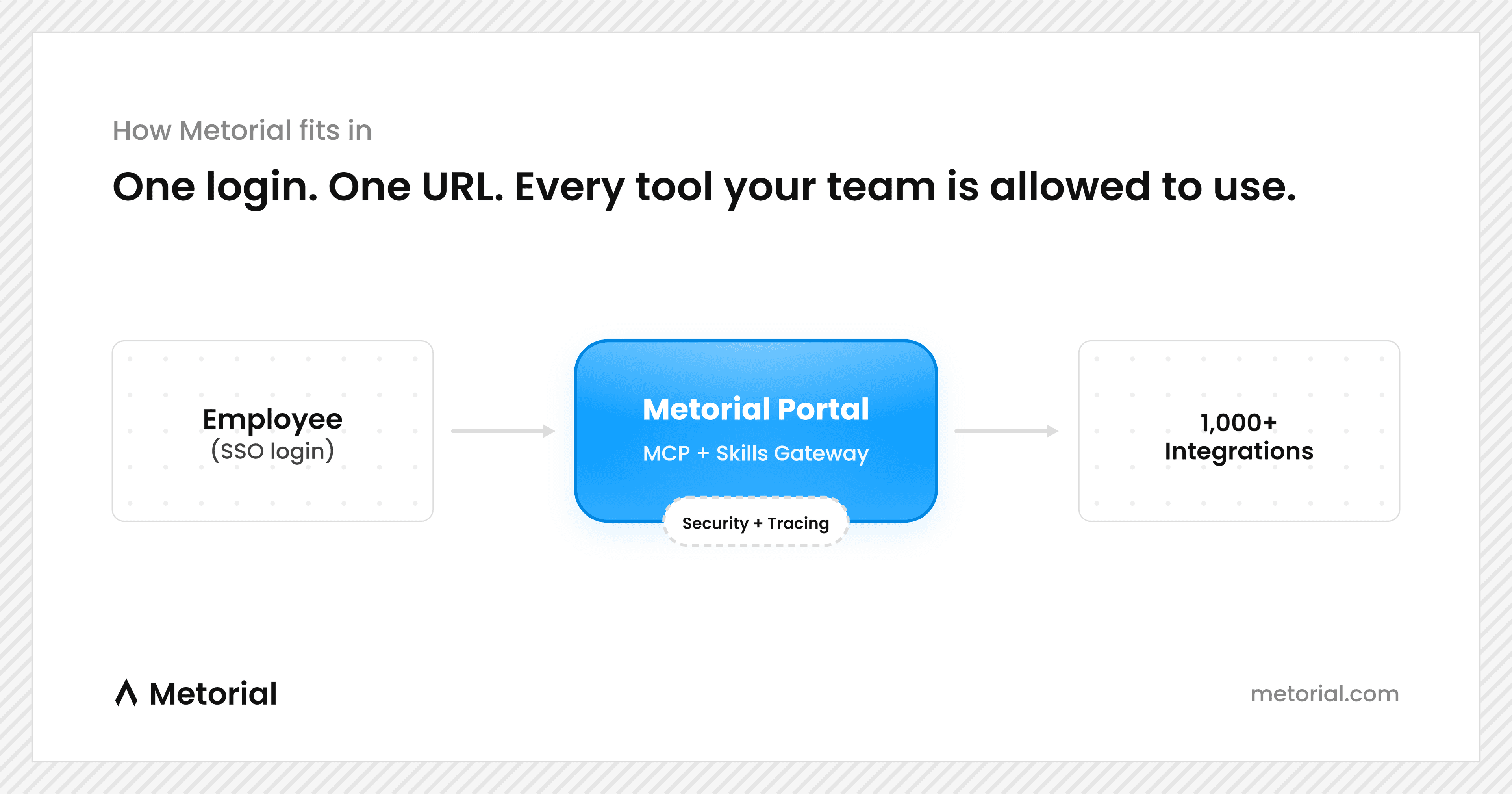
An MCP gateway is a single endpoint between AI clients, such as Claude, ChatGPT or Cursor, and the MCP servers that connect them to company tools. People sign in once through your identity provider, and the gateway applies the same access rules and audit log to every tool call, instead of each laptop holding its own servers and tokens.
- 01
MCP servers configured per laptop
Without a gateway, each person wires up their own servers, so no two setups match.
- 02
Tokens pasted into local config files
Personal API keys end up on laptops with no owner and no expiry.
- 03
Every new tool means another security review
Without one control point, each integration is approved and logged separately. A gateway puts sign-in, access rules, and the audit log in one place.
What an MCP gateway does
It replaces per-laptop setups with one governed path between every AI client and your company's tools.
One URL for every MCP server
Each person pastes one Magic MCP URL into their AI client and reaches 1,100+ verified MCP servers, plus the custom, remote, and Docker-based servers your team runs.
Sign-in and access in one place
People sign in with company SSO. Agents act on that person’s own connected accounts and can never exceed what the person behind them is allowed to do.
One record of every call
Each tool call is checked against policy and recorded with the person behind it, so security can answer who did what without asking around.
How an MCP gateway works
One URL, one identity, one policy, and one log for every AI client in the company.
One URL in every client
Each person adds their Magic MCP URL to Claude, ChatGPT, Cursor, Codex, or their own agent. The same approved tools show up everywhere.
Identity from your SSO
People sign in to their portal with your identity provider. Their groups decide which integrations and skills they see.
Policy on every call
Each tool call is checked against your access rules, and Protoguard screens it for prompt injection before it reaches the tool.
A log of who did what
The call runs on that person's own connected account and is recorded with their identity, ready for review.
Teams running Metorial as their MCP gateway


SSO and SCIM with Microsoft Entra ID and Okta
Metorial connects to the identity provider you already run through SAML single sign-on, so people sign in with their company account and existing groups carry over.
- 01
Sign in once
People sign in with Microsoft Entra ID, Okta, Rippling, or another SAML or OAuth identity provider, then reach every approved tool through one URL.
- 02
Groups decide access
Existing groups carry over and decide which integrations, tools, and skills each person sees.
- 03
Provisioning with SCIM
SCIM keeps users and groups in sync with your directory, so access follows people as they join, change teams, and leave.
Per-user OAuth: every agent acts as a real person
Each person connects apps with their own account, so an agent can never reach more than the person behind it. No shared service accounts and no API keys in config files.
- 01
Connect once, use in every client
A person connects Slack, GitHub, or Salesforce once, and that connection works in every AI client they use through the gateway.
- 02
Managed or your own OAuth apps
OAuth apps are managed by Metorial by default, and enterprises can bring their own for more control.
- 03
Revoke access per person
Limit each agent and revoke a person's access at any time, without rotating a key everyone else depends on.
Tool-level permissions and read-only access
Admins grant whole integrations or single tools by role with policies and access control, so each team gets exactly what it needs.
- 01
Allow or block single tools
Allow an integration but block specific tools, such as actions that delete or send.
- 02
Read-only sets
Give a team only the read tools of an integration, without building a second integration.
- 03
Agents inherit the limits
An agent never exceeds the access of the person behind it, in any AI client.
Audit logs and SIEM export
Every tool call is tied to the person and agent behind it, so security can answer who did what without asking around.
- 01
A per-person audit log
Audit logs give a filterable history of what people, agents, and machine users did across your integrations and skills.
- 02
Full tracing
Session logs capture every tool call, message, and execution, with the provider response, for debugging and review.
- 03
Export to your SIEM
Stream audit logs to Datadog or Splunk, or run an Outpost in your network to send traffic to OpenTelemetry, Elasticsearch, or any HTTP endpoint.
One MCP gateway for Claude, ChatGPT, Cursor, Claude Code and Codex
Anything that speaks MCP connects through the same URL and reaches the same approved tools, so teams can use different clients under one policy. Setup guides: Claude Code, ChatGPT, Cursor, and Codex.
- 01
Every client, one policy
Engineers in Cursor or Claude Code, sales in ChatGPT, operations in Claude: each person sees the tools their role allows, wherever they work.
- 02
Your own agents too
Agents you build connect through the same gateway, or through the TypeScript and Python SDKs.
- 03
Shared skills
Teams edit skills in the browser, sync them to Git, and deliver them by role, so a workflow written once reaches everyone who needs it.
Self-hosted and on-prem MCP gateway
Metorial is open source. Run it in your own cloud or data center, or use Metorial Cloud and let us operate it.
- 01
Self-host from GitHub
The core is open source on GitHub and self-hosts with Docker Compose.
- 02
On-prem and air-gapped
Enterprise customers can run Metorial on-prem, including air-gapped environments, with dedicated support and SLAs.
- 03
Compliance for regulated teams
SOC 2 Type II, GDPR, HIPAA BAAs, and EU and US regions for data residency. See security.
1,100+ MCP servers behind one gateway
Verified integrations work out of the box, versioned and with per-user OAuth. Bring custom, remote, or Docker-based servers for internal systems. Browse all integrations.

Slack
Slack: connect with bot OAuth or user OAuth to work with messages, conversations, search, files, Canvases, Lists, profiles, reactions, reminders, and workspace productivity settings.

GitHub
Manage repositories, issues, and pull requests. Create and configure branches, star repositories, review code, and merge changes. Automate CI/CD workflows with GitHub Actions, manage workflow runs, secrets, and artifacts. Track issues with labels, milestones, and assignees. Search across code, repositories, issues, and users. Manage organizations, teams, and memberships. Create and manage projects, gists, packages, deployments, and environments. Access security alerts including code scanning, secret scanning, and Dependabot alerts. Read and write file contents in repositories. Manage webhooks, notifications, and codespaces.

Hubspot
Create, read, update, and delete CRM objects including contacts, companies, deals, tickets, and custom objects. Manage associations between CRM records. Track engagements such as calls, emails, meetings, notes, and tasks. Send transactional and marketing emails, manage campaigns, and handle subscription preferences. Build and manage marketing workflows, sequences, and automation actions. Manage CMS content including blog posts, landing pages, and HubDB tables. Handle commerce data including products, orders, invoices, quotes, and payments. Create and manage contact lists for segmentation. Configure deal, ticket, and order pipelines with custom stages. Search and filter CRM records. Bulk import and export CRM data. Manage users, teams, and account settings.

Linear
Create, read, update, and delete issues across teams with support for priorities, labels, assignees, due dates, and workflow states. Manage projects that group related issues, and organize work into time-boxed cycles (sprints). Create and manage documents, comments, and file attachments. Search issues using vector similarity or rich filters. Configure teams, workflow states, and labels. Track customers and link them to issues.

Salesforce
Manage CRM data including Accounts, Contacts, Leads, Opportunities, Cases, and custom objects. Create, read, update, and delete records. Query data using SOQL and search across objects using SOSL. Perform bulk data operations for large-scale imports, exports, and migrations. Execute composite requests to batch multiple operations in a single API call. Access analytics, reports, and dashboards. Manage files and attachments associated with records. Interact with Chatter feeds, posts, and groups for social collaboration. Manage org metadata including custom objects, fields, layouts, and workflows. Query data using GraphQL for precise data retrieval across related objects.

Microsoft Teams
Send, read, edit, and delete messages in Microsoft Teams channels and chats, with @mentions. Create and manage teams, channels, members, and tags. Schedule and look up online meetings, read user presence, and manage Shifts schedules. Connect a Teams bot to receive and reply to messages in chats and channels.
MCP gateway pricing
Start free and move up when the whole company needs it. See pricing for every plan detail.
- 01
Dev: free
500K tool calls a month and up to 10 integrations, to try it out.
- 02
Scale: $250 a month
2.5M tool calls a month, unlimited integrations, and 20 workforce seats included.
- 03
Enterprise: custom
SAML SSO, granular permissions, on-prem deployment, advanced compliance, and Slack or Teams support with an SLA.
How Metorial compares to other MCP gateways
Side-by-side guides built from each vendor's own docs and pricing pages.
Enterprise
Enterprise MCP gateways compared
Ten gateways compared on SSO and SCIM, per-user OAuth, audit logs, and self-hosting.
Open source
Open-source MCP gateways compared
Eleven open-source gateways compared on license, GitHub stars, SSO, and per-user OAuth.
Deployment
Self-hosted vs managed
What it takes to run an MCP gateway yourself, and when a managed one is the better call.
Head to head
Metorial vs each alternative
Feature-by-feature pages for Runlayer, Composio, Arcade.dev, Obot, and more.
MCP gateway FAQ
Common questions about MCP Gateway.
What is an MCP gateway?
An MCP gateway is a single endpoint between your AI clients and every MCP server they call. It signs people in through your identity provider, checks each tool call against your access rules, and records it. Those controls live in one place instead of in every server and on every laptop.Which MCP gateway works with Claude, ChatGPT and Cursor at the same time?
Metorial does. Each person adds one Magic MCP URL to Claude, ChatGPT, Cursor, Claude Code, Codex, or any other MCP client, and the same approved tools appear in all of them. Access rules and the audit log are shared across clients, so switching clients does not change what a person can do.Can one MCP gateway apply the same access policy to official, custom-built and self-hosted MCP servers?
Yes. In Metorial, verified catalog integrations, vendor-hosted remote servers, custom servers you build, and Docker-based servers all get the same sign-in, access rules, and logging. You do not rewrite a server to put it behind the gateway.How does an MCP gateway connect to Microsoft Entra ID?
Through single sign-on. In Metorial you connect Entra ID once over SAML, people sign in with their company account, and existing groups carry over to decide which integrations and tools each person sees. Okta, Rippling, and other SAML or OAuth identity providers work the same way, and SCIM keeps users and groups in sync.Does every employee use their own credentials through the gateway?
Yes. With per-user OAuth, each person connects apps such as Slack, GitHub, or Salesforce with their own account, so an agent can never reach more than the person behind it. Nobody pastes shared API keys into config files.Can we give a team read-only access to a tool?
Yes. Admins allow or block whole integrations or single tools by role, so a team can get only the read tools of an integration. The rule applies in every AI client that person uses.What does an MCP gateway log?
Metorial records each tool call with the person and agent behind it in a per-person audit log. Session logs capture every tool call, message, and execution in a connection, and logs can be exported to the SIEM or observability tools your security team already uses.Is Metorial open source and can we self-host it?
Yes. Metorial is open source on GitHub and runs in your own cloud with Docker Compose, or on-prem for teams with strict compliance needs. If you would rather not operate it, Metorial Cloud runs the same gateway with EU and US regions.Does an MCP gateway add latency?
A little. It adds one network hop plus policy evaluation, typically a few milliseconds, which is small next to the model inference and the upstream API call in the same request.How is an MCP gateway different from an API gateway?
An API gateway fronts HTTP endpoints and routes by path and method. An MCP gateway fronts tools that a model chooses at runtime, so it also has to handle per-user credentials and record which person each call ran as. See MCP vs API.What is the difference between an MCP server and an MCP gateway?
An MCP server exposes the tools of one app or system. A gateway sits in front of many servers and decides who may call which tool, runs the sign-in, and records each call, so those rules are not rebuilt inside every server.What is shadow MCP, and how does a gateway stop it?
Shadow MCP is MCP servers people set up on their own machines, with personal tokens and no record of what they call. A gateway gives them one approved URL behind SSO that is easier than the workaround, so tool use is visible and follows company policy. See what is shadow AI.How much does an MCP gateway cost?
Metorial has a free Dev plan, a Scale plan at $250 a month with 20 workforce seats included, and an Enterprise plan with SAML SSO, granular permissions, and on-prem deployment. See pricing for what each plan includes.Do I need an MCP gateway for a single AI client?
Usually not. One developer with one client and a few servers is better off configuring them directly. A gateway earns its place when a second client or a second person needs the same integrations, because that is when per-person setup and shared credentials start.